
CMS SecureMe
Scam help for the whole family.

Your family's security, on whatever network they are on, and someone in your corner if it goes wrong.
Six checks that matter
A score built from whether your email has turned up in a data breach, how your passwords hold up, whether two-factor sign in is on where it counts, how your phone is set up, what your social accounts tell strangers, and your phone number. Answers run out after a while, because a list you ticked six months ago describes a phone that has had six months of updates since.
What to do, in order
A plan that puts the biggest risks first, written so it assumes nothing. Step by step guides that take you straight to the setting instead of telling you to go and find it. Tools for the moment you need them: a password maker, a locked store for backup codes, a scam message checker, a link checker and a Wi-Fi check.
Help after it goes wrong
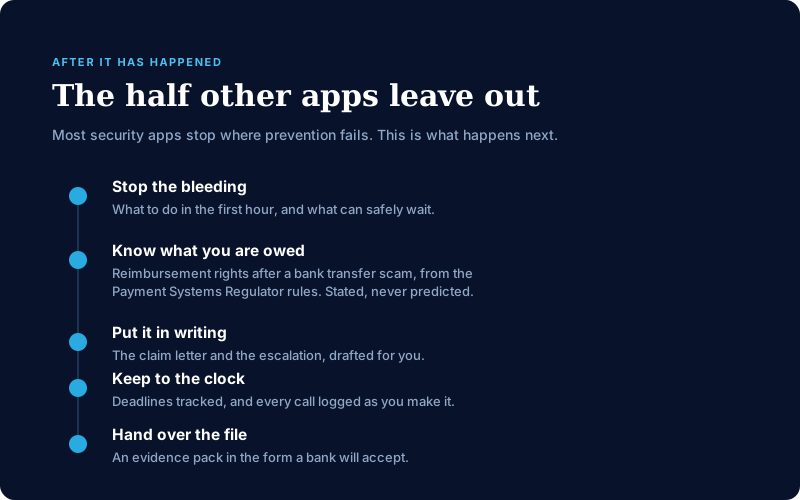
Most apps stop at prevention. This one keeps going. It tells you what to do first and what can wait, explains your right to get money back after a bank transfer scam using the Payment Systems Regulator's rules, points you at the right place to report it, and puts together a pack of evidence for your bank.
A plan for the people you look after
Six people, extendable to ten. Adults see each other's overall score, never the detail behind it, and anyone can stop sharing theirs. Open the family screen and it points out whose score has fallen and who has not checked for a fortnight, which is the bit that matters if you are the one your parents ring.
Everything in CMS SecureMe today
Listed because it exists in the build, not because it is on a roadmap. Anything still being written is described as such in the words further down, never as a bullet with an icon beside it. Anything in a plan that is not on sale yet says so in its own description.
It measures, rather than assumes
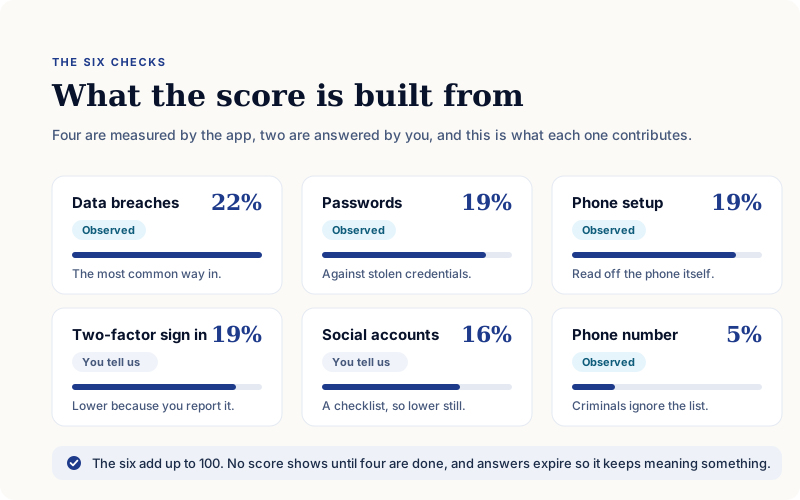
A number you can act on has to come from somewhere. Four of the six are observed by the app rather than taken on trust, and what each one contributes is below rather than kept to ourselves.
Six things that predict harm
Whether an email address has appeared in a data breach, how passwords hold up against known stolen credentials, whether two-factor sign in is on where it matters, how the phone itself is set up, what social accounts tell strangers, and the phone number.
Measured, not just asked
Four of the six are checked by the app rather than self-reported: your email against known breaches, your passwords against stolen credentials, your phone's own screen lock, biometrics and operating system, and your phone number. A questionnaire measures what someone believes about their phone. This measures the phone.
Answers that expire
Settings drift and updates reset them. Rather than treat a tick from six months ago as still true, the app asks again, which is why the score still means something a year in.
Weighting you can actually read
What each check contributes is published above, not asserted. Breaches carry 22 per cent, because a stolen password is the most common way into an account. The phone number carries 5, because criminals ignore the opt-out list and a control that does not cut risk should not score as though it does. The rest sit between the two on the same principle: weighted by how well each predicts real harm, not by how easy it is to measure.
It turns findings into a short list
A ranked plan in language that assumes no technical knowledge, and routes that end at the setting rather than at a search box.
Ordered by what helps most
The action plan leads with what reduces risk most, not with what is quickest to tick off. Each item says what it is for.
Straight to the setting
Step by step routes take a person to the exact screen that needs changing, rather than telling them to go and find it somewhere in their phone.
Written for people, not for engineers
No acronyms without explanation and no jargon standing in for advice. Guidance nobody understands protects nobody.

The everyday checks, in one place
The things people reach for in the moment something looks wrong, without hunting for a different app each time.
Phishing and email checker
Paste a suspicious email and find out what is wrong with it.
Text message analyser
The same for the messages that arrive claiming to be a delivery or a bank.
Link and safe browsing check
Check a web address before opening it. The lookup runs on our server rather than from the phone.
Password generator
Strong passwords made on the device, for the moment one is needed.
An encrypted vault
Recovery codes and sensitive numbers, encrypted on the phone, in the platform's own secure storage.
Wi-Fi safety check
Whether the network being joined is one that has been trusted before, checked on the device.
It stays with you after the fact
Most security apps stop at the point prevention fails. This is built around the half that comes after, and that is the half nobody else in the consumer market covers.
Guided incident response
What to do first and what can safely wait, at the point when nobody is in a state to work that out for themselves.
Your reimbursement rights
What applies after an authorised push payment scam, sourced to the Payment Systems Regulator rules and stated without predicting how any particular claim will end.
The letter, written for you
The claim and the escalation drafted, so a person is not composing the most important letter of their year from scratch.
Deadlines and a record of every call
The clock that starts after a claim is tracked, and each call is logged as it happens rather than remembered afterwards.
An evidence pack a bank will accept
Assembled in the form the bank expects, which is usually the difference between a claim that moves and one that stalls.
Erasure requests you send yourself
UK GDPR erasure requests drafted for the person to send from their own address, because it is their request to make.
The right place to report it
The UK reporting routes that actually apply, Police Scotland included, rather than a single number that is wrong for part of the country.
It works for a household, not a handset
The unit of protection is the group of people, because that is how households actually work.
Up to six people on one plan
One plan covers the family rather than one plan each, and it extends to ten.
A score, never the answers
Adults on a plan see each other's overall score, never the detail behind it, and anyone can stop sharing theirs.
See what has changed
Open the family screen and it points out whose score has fallen and who has not checked for a fortnight, which is the part that matters if you are the one your parents ring.
A route for a parent without their own phone
Two ways to set somebody up, because not every person being looked after has a device of their own to install anything on.
A list of what matters if something happens to you
Accounts, subscriptions, contacts and notes, encrypted on the device, so the person who has to find them later can. It is a list, not a legal will.
What is true here that is not true elsewhere
It does not matter who your phone is with
The comparable UK products are sold through a mobile bill and are simply unavailable to anybody not on that network. UK households are not all on one network. There is no carrier check anywhere in this app.
One plan covers the family, not one plan each
Security priced per person prices out exactly the households that need it most, which tend to be the ones with the most people in them.
We hold nothing worth selling
No advertising code, no third-party tracking or analytics, no data brokers. Audit answers, vault entries, account records and score history stay on the phone unless you choose to keep a backup with your account, and that is sealed with a passphrase we never receive. Exactly what leaves the device is listed in plain English inside the app, and crash diagnostics stay off until somebody turns them on.
It tells you when it does not know
Where a checker cannot establish that something is safe, it says so rather than guessing. "We cannot tell" is a real answer in this product, and the honesty is the feature.
Built and run in the UK
The backend is pinned to the London region, and the guidance, reporting routes and consumer rights it cites are the UK ones rather than a translation of somebody else's.
Who it is for
The people scammers go after most are the ones security products serve least: parents, grandparents, and anyone whose phone is their whole digital life.
It works on any network, because being safe from fraud should not depend on who you buy your mobile contract from.
What the score means
Six areas, weighted by how well each one predicts real harm rather than by how easy it is to measure. Here is the whole of it:
| Check | Counts for | How we know |
|---|---|---|
| Data breaches | 22% | We check it against a real list |
| Passwords | 19% | We check them against known stolen ones |
| Phone setup | 19% | We read it off the phone |
| Two-factor sign in | 19% | You tell us |
| Social accounts | 16% | You tell us |
| Phone number | 5% | We check it |
They add up to 100. Four of the six we measure ourselves, and the two you answer carry less than they otherwise would, because your word about a setting is a real signal and still not the same thing as having looked.
Data breaches carry the most weight. A stolen password is the most common way into someone’s account, and we check it against a real list rather than asking you.
Your phone number carries the least. Signing up to the Telephone Preference Service does not stop scam calls, because criminals ignore it, and a control that does not cut your risk should not carry weight that says it does.
No overall score shows until at least four of the six areas are done. Checking a phone number takes about fifteen seconds, and an app that answered that with “100 out of 100, Strong” would be lying to the person who most needed the truth.
What leaves your phone
Being straight about this matters. Your answers, your saved codes, your records and your score history stay on the device unless you choose to keep a backup with your account. What does leave is listed in full, in plain words, inside the app and in the privacy notice on this site:
- an email address, to check it against known data breaches
- the first five characters of a scrambled password, never the password itself
- a phone number, for a preference service lookup
- a web address you asked us to check
- for a plan, a locked copy of a score that we cannot read, plus a display name and a notification token that are not locked
- your Apple or Google sign-in and your purchase receipt, if you buy a plan
- if you keep a backup with your account, a sealed copy of what the app holds, locked with a passphrase we never receive
- if you agree to it, anonymous counts of what was used, not who used it
Two things are worth saying out loud rather than leaving to the small print. If you turn on monitoring, we hold the address being watched under a key we hold ourselves, because checking it while your app is closed means we have to. And if you set up plan recovery, we store a locked copy of your family key that only your passphrase opens. Both are explained in the privacy notice.
When you can get it
CMS SecureMe is not on the App Store or Google Play yet. There is no listing to link to and nothing to download, and we would rather say so than put up a button that goes nowhere.
The privacy notice and terms are published here ahead of time, because an app that asks people to trust it should be readable before it ships, not after.
What CMS SecureMe is not
- Not antivirus. It does not look for viruses, it is not a VPN, and it does not filter your internet or block calls.
- When a check cannot tell whether something is safe, it says so instead of guessing. "We cannot tell" is a real answer here, and you will see it.
- No advertising code, no third-party tracking or analytics. Your answers, your saved codes, your records and your score history stay on your phone unless you choose to keep a backup with your account, sealed with a passphrase we never receive.
The documents for CMS SecureMe
- CMS SecureMe privacy noticeWhat CMS SecureMe holds, what leaves your phone, who receives it and why. Most of your data stays on the device. Everything that does not is listed here, and so is the one key we hold ourselves.
- CMS SecureMe terms and conditionsOne document for the whole app and everything you can buy in it: what the licence allows, what CMS SecureMe is and is not, what its checks can and cannot tell you, and how price, renewal, cancellation and refunds work.